- HubPages»
- Technology»
- Communications»
- Smartphones»
- iPhone
How to lock the iPhone/iPod touch screen in portrait orientation

Have you ever wanted to force your iPod touch or iPhone to stay in the portrait orientation like the iPad can? Sometimes, the switching from the landscape to portrait screen orientation can be annoying when you are using a device. Unlike the iPad there is no physical switch to lock the screen orientation. But if you own a iPhone 3GS or newer or a third generation iPod Touch or newer that is running at least iOS 4, you can lock your device's screen in portrait orientation.

Step 1
Tap the home button quickly twice. This will bring up the multi-task bar. This bar will show the application icons that are running the background of your device. It is mostly used to switch between background applications, but it is also the access to the screen lock.
Step 2
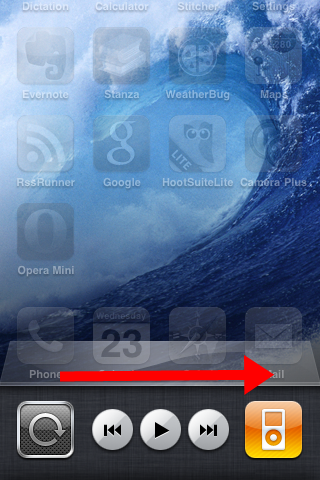
Swipe your finger from left to right at the across the bar. The bar will now display the skip forward, skip back, play button and the iPod icon. The iPod icon is used to quickly start the iPod application. The other buttons are used to control which audio track is being played on the iPod or other audio applications.
Step 3
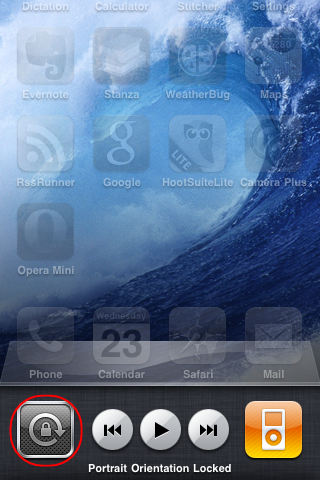
Touch the leftmost screen lock button. A padlock will appear inside they button and the message “Portrait Orientation Locked” should appear briefly. Push the home button once again and your iPhone or iPod Touch will return to normal except that screen orientation is now locked in portrait orientation. To unlock, you just need to follow the same steps again.
Notes
Unfortunately Apple decided that the screen orientation lock should only work for portrait,but not for landscape mode.
Other iPhone and iPod Touch Tips and Tricks
- The Best iPhone 4 Cases You Can Buy
The iPhone 4 is the best cell phone out there with or without a case. It is built with a tempered glass in front and solid back with a stainless steel metal band wrapped around for the bezel. The band is... - How stop background apps on an iPhone, iPad or iPod ...
Many people have asked with the iPhone, iPad or iPod multi-tasking, is it possible to stop a background apps? With iOS 4, the iPhone, iPod and iPod Touch gained the ability to multi-task. Unfortunately while... - How to delete the search history for the iPad or iPh...
Why would you need to clear the search history for an iPad or iPhone? Web browsers keep the history on not only where you have gone but all of the terms you have ever searched on. The search history is... - How to Delete Browser History on the iPhone, iPad or...
All web browsers keep track of the web pages it has visited. This feature is meant to help the browsers to load certain pages/images faster. But it can also be used to look at the web sites that a web browser...